

Entities Integration Guide
Overview
This guide outlines the integration approach for syncing counterparty and entity data between your upstream platform and Ironclad. While the API provides flexible automation capabilities for ongoing data synchronization, organizations have multiple options for the initial migration of existing counterparties. For large-scale migrations, Ironclad's UI-based migration tool offers a streamlined bulk import process, while the API approach provides programmatic control for organizations with specific technical requirements. Understanding both methods, along with their respective capabilities and constraints, will help you choose the optimal approach for your integration needs.
Initial Migration Options
The initial migration of existing counterparties to Ironclad entities can be accomplished through two methods:
UI-Based Migration (Recommended for Large Volumes)
For organizations migrating a large number of entities, we recommend using Ironclad's UI-based migration tool. This approach provides a streamlined, bulk import process that simplifies large-scale migrations.
To migrate entities via the UI, follow the steps outlined here:
Migrate Entities to Ironclad
API-Based Migration
The initial migration can also be performed via the API, which may be preferable for organizations with specific technical requirements or existing automation frameworks. However, it's important to note the API rate limits when planning an API-based migration.
API Rate Limits:
CLM API Rate Limits
Ongoing Integration Points
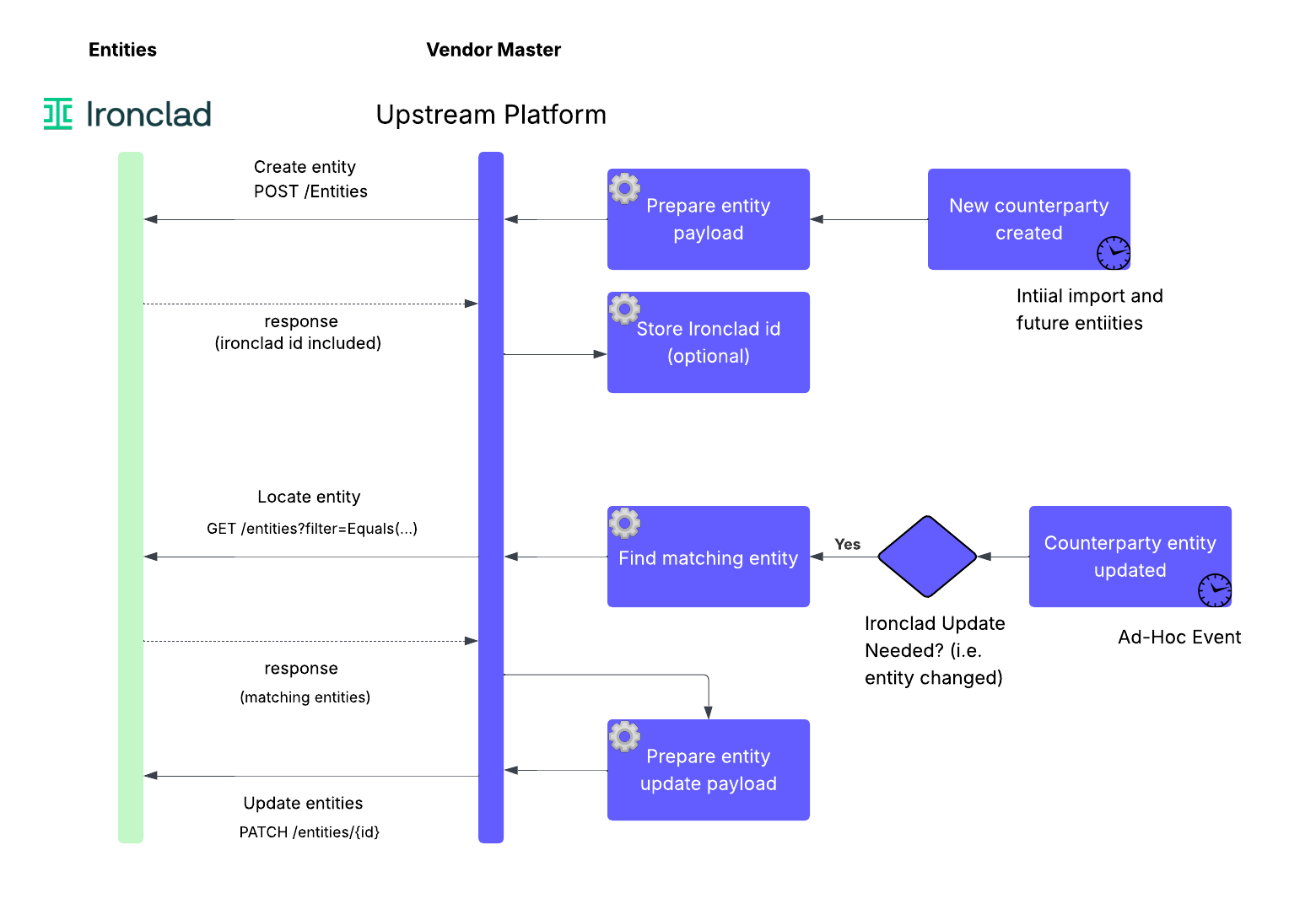
The integration will use Ironclad's public API to create and update entities. There are three key integration points involved:
- Performing a one-time load of existing counterparties into Ironclad entities,
- syncing new entities created in the future to Ironclad, and
- updating existing entities in Ironclad when relevant data changes in the source.
API Endpoints
The web request diagram that follows summarizes these steps. Three API endpoints are referenced in the diagram:
- Creating entities (POST /entities) See also the API CRUD Guide for more detailed information.
- Retrieving entities with a filter (GET /entities)
- Updating entities (PATCH /entities)
Updated 11 months ago